Introduction:
Android is a Linux based operating system it is designed primarily for touch screen mobile devices such as smart phones and tablet computers. The operating system have developed a lot in last 15 years starting from black and white phones to recent smart phones or mini computers. One of the most widely used mobile OS these days is android. The android is software that was founded in Palo Alto of California in 2003.
The android is a powerful operating system and it supports large number of applications in Smartphones. These applications are more comfortable and advanced for the users. The hardware that supports android software is based on ARM architecture platform. The android is an open source operating system means that it’s free and any one can use it. The android has got millions of apps available that can help you managing your life one or other way and it is available low cost in market at that reasons android is very popular.
The android development supports with the full java programming language. Even other packages that are API and JSE are not supported. The first version 1.0 of android development kit (SDK) was released in 2008 and latest updated version is android10.
Android Architecture:
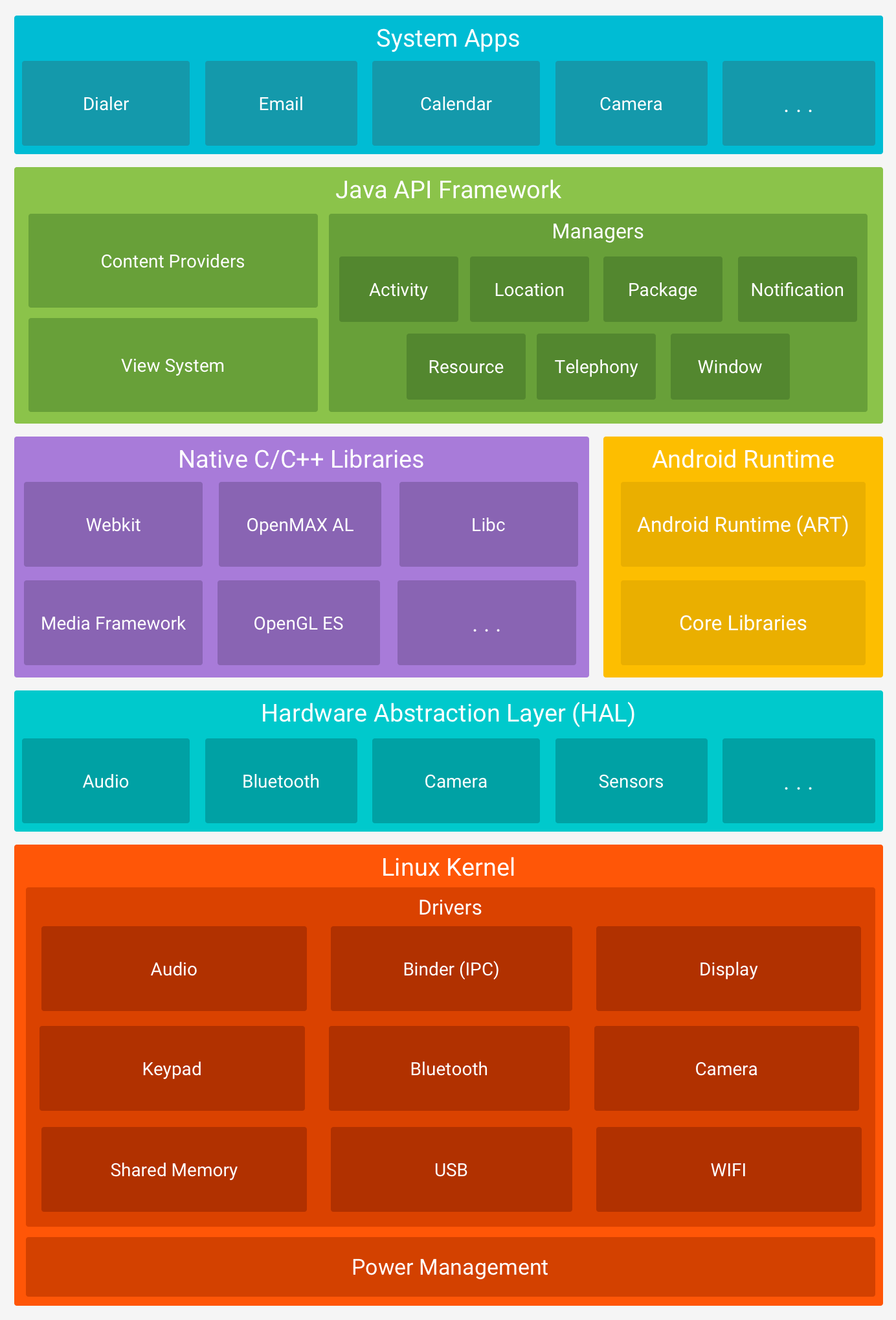
Android is an open source, Linux-based software stack created for a wide array of devices and form factors. The following diagram shows the major components of the Android platform.
Click On Image To Enlarge
The Linux Kernel
The android uses the powerful Linux kernel and it supports wide range of hardware drivers. The kernel is the heart of the operating system that manages input and output requests from software. This provides basic system functionalities like process management, memory management, device management like camera, keypad, display etc the kernel handles all the things. The Linux is really good at networking and it is not necessary to interface it to the peripheral hardware. The kernel itself does not interact directly with the user but rather interacts with the shell and other programs as well as with the hard ware devices on the system.
Hardware Abstraction Layer (HAL)
The hardware abstraction layer (HAL) provides standard interfaces that expose device hardware capabilities to the higher-level Java API framework. The HAL consists of multiple library modules, each of which implements an interface for a specific type of hardware component, such as the camera or bluetooth module. When a framework API makes a call to access device hardware, the Android system loads the library module for that hardware component.
Android Runtime
In a simplest term it is a system used by operating system which takes care of converting the code that you write in a high level language like Java to machine code and understand by CPU/Processor. ART(Android Runtime) is written to run multiple virtual machines on low-memory devices by executing DEX files.So You will have a question now what is DEX File?. DEX(Dalvik executable) file is an executable file saved in a format that contains compiled code written for Android.
Native C/C++ Libraries
Let’s say your app is a game which uses a lot of physics and intensive computation, so using C/C++ libraries may help you with issues resource consumption. That way your game performs better as it is harnessing some extra resources from the system itself. Resource means like files that your code uses, such as bitmaps, animation instructions, and more. Many core Android system components and services, such as ART(Android Runtime) and HAL(Hardware Abstraction Layer), are built from native code that require native libraries written in C and C++.
Java API Framework
The entire feature-set of the Android OS is available to you through APIs written in the Java language. These APIs form the building blocks you need to create Android apps by simplifying the reuse of core, modular system components and services, which include the following:
System Apps
Android comes with a set of core apps for email, SMS messaging, calendars, internet browsing, contacts, and more. Apps included with the platform have no special status among the apps the user chooses to install. So a third-party app can become the user's default web browser, SMS messenger, or even the default keyboard (some exceptions apply, such as the system's Settings app). The system apps function both as apps for users and to provide key capabilities that developers can access from their own app. For example, if your app would like to deliver an SMS message, you don't need to build that functionality yourself—you can instead invoke whichever SMS app is already installed to deliver a message to the recipient you specify.