EXPLAINING PROJECT STRUCTURE [Manifest Part 1]:
Now we will see the project structure. In previous blog i have tell you about how to create a new project in android studio. Now after creating project our main thing's start from here. So let's see in detail.
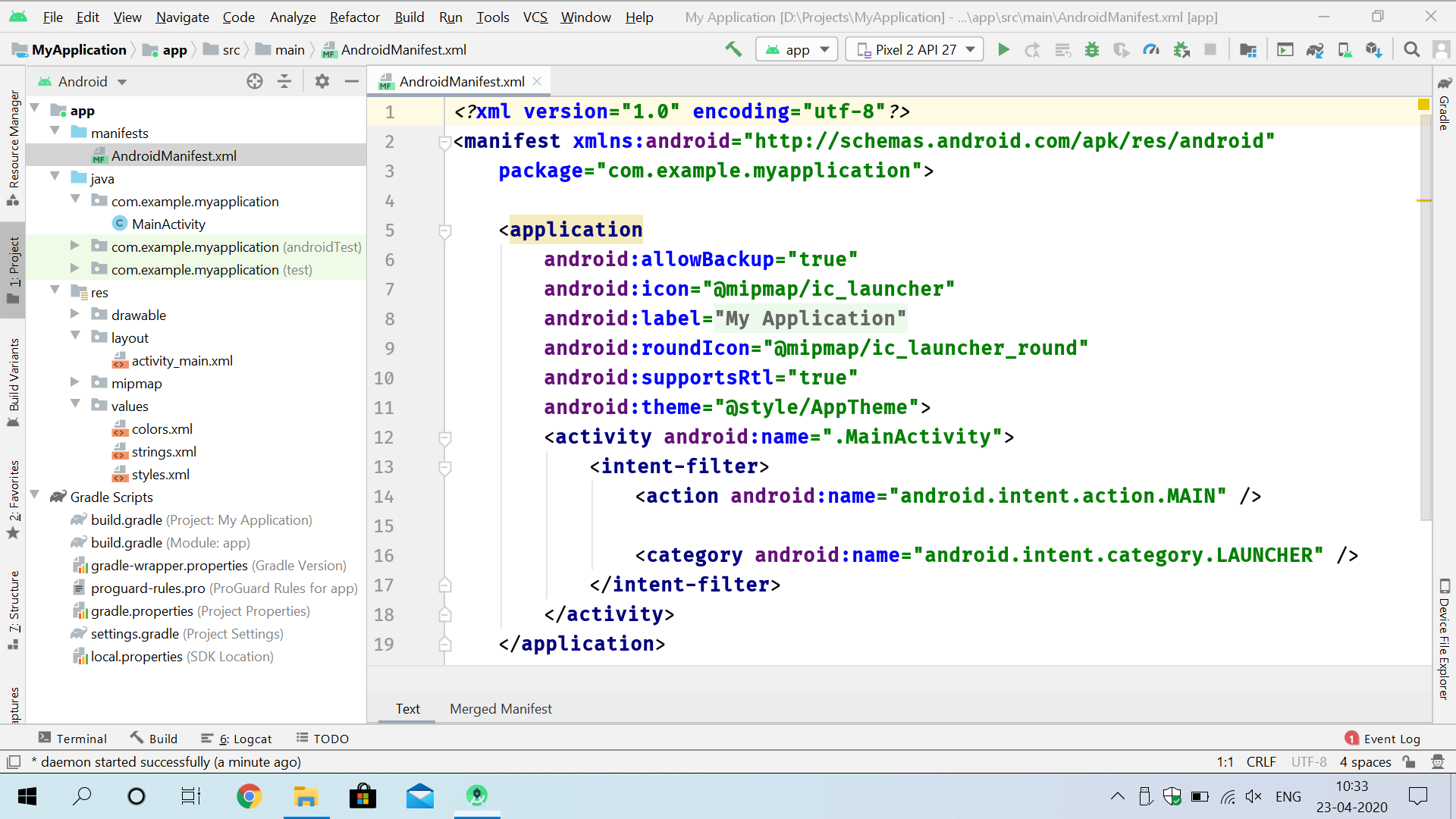
When you create a empty application from template screen you will see this screen as below pic given.
This is screen which will after creating a new project.
Project Structure:
Now see on the left side pannel of android studio. Or if the pannel is hidden then just click on project tab present on left side see a vertical menu present in left side their is option named as project click on the project to see your project structure. See the below pic how project structure looks.
Project structure of your app
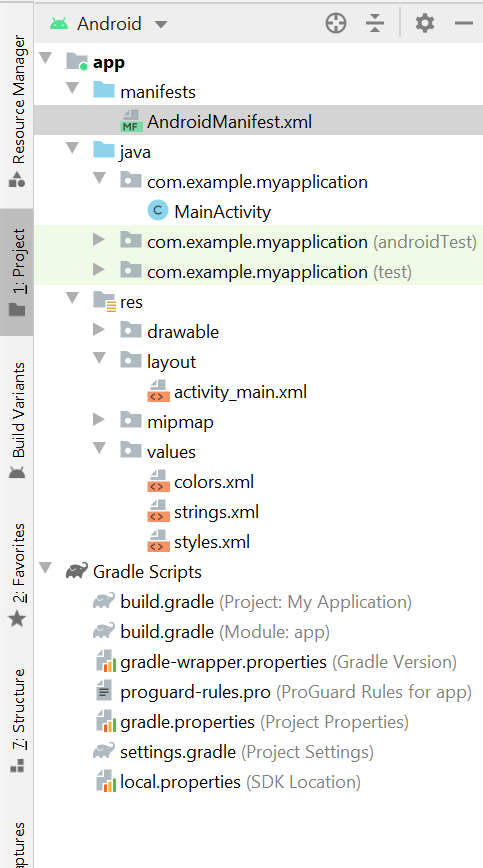
Now will see in detail of project structure files. So let's start from manifest file first. Today we will learn only 50% about manifest because this blog is really long. And it's second part will be available tommorow.
AndroidManifest.xml :
What is manifest?. Every app project must have an AndroidManifest.xml file (with precisely that name) at the root of the project source set. The manifest file describes essential information about your app to the Android operating system, and etc...
So let's see in detail what's inside the manifest:
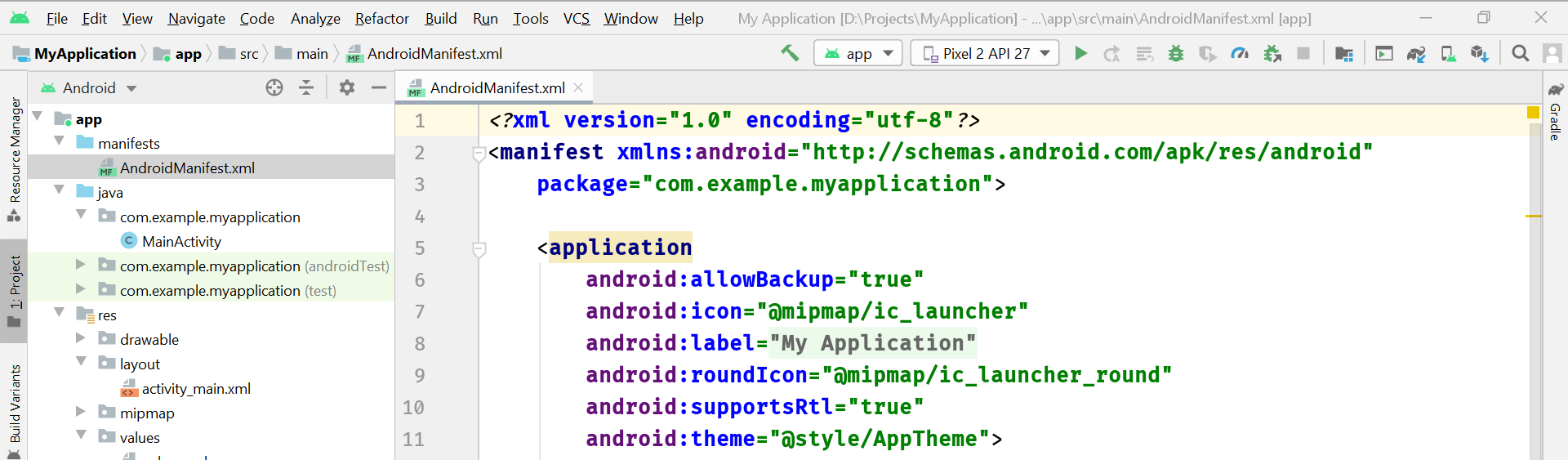
Package name in manifest
See in the below pic package name is declared in manfiest. as in my previous blog i have tell you about package name.

While building your app into the final application package (APK), the Android build tools use the package attribute for two things:
Now you will have a little bit question what is android build tools and what is R.java class. So let's see in more detail about this
Android Build Tools
In simple language i can only say that android build tools is a component for android that is required to build android apps.
R.java class
Android R.java class is an auto-generated file by aapt (Android Asset Packaging Tool) that contains resource IDs for all the resources of res/ directory. So now again question arise what is aapt. AAPT is a tool to pack your java classes files and resources into a app... normally known as APK file..So what are resource IDs..Let's took an example here: Their are two boys in a class and their names are also same so when you want to call one boy but his and another boy name is same so how will you call that boy..Yeah answer is simple you will call that boy by its Roll no..Like this only resource IDs are.. When their are two input text field with same name but their IDs are different one text field Id is input1 and another text field Id is input2. So this is called resource IDs. On later blogs we gonna use this ID when we will design the app.
App components
So what are app components?. App components are the essential building blocks of an Android app. Each component is an entry point through which the system or a user can enter your app. Some components depend on others.
There are four different types of app components:
Each type serves a distinct purpose and has a distinct lifecycle that defines how the component is created and destroyed. The following sections describe the four types of app components. Now we will se in details of different types of app components.
Activities
An activity is the entry point for interacting with the user. It represents a single screen with a user interface. For example, an email app might have one activity that shows a list of new emails, another activity to compose an email, and another activity for reading emails. Although the activities work together to form a cohesive user experience in the email app, each one is independent of the others. As such, a different app can start any one of these activities if the email app allows it. For example, a camera app can start the activity in the email app that composes new mail to allow the user to share a picture. An activity facilitates the following key interactions between system and app:
You implement an activity as a subclass of the Activity class. For more information about the Activity class, see the Activities developer guide.
Services:
A service is a general-purpose entry point for keeping an app running in the background for all kinds of reasons. It is a component that runs in the background to perform long-running operations or to perform work for remote processes. A service does not provide a user interface. For example, a service might play music in the background while the user is in a different app, or it might fetch data over the network without blocking user interaction with an activity. Another component, such as an activity, can start the service and let it run or bind to it in order to interact with it. There are actually two very distinct semantics services tell the system about how to manage an app: Started services tell the system to keep them running until their work is completed. This could be to sync some data in the background or play music even after the user leaves the app. Syncing data in the background or playing music also represent two different types of started services that modify how the system handles them:
Bound services run because some other app (or the system) has said that it wants to make use of the service. This is basically the service providing an API to another process. The system thus knows there is a dependency between these processes, so if process A is bound to a service in process B, it knows that it needs to keep process B (and its service) running for A. Further, if process A is something the user cares about, then it also knows to treat process B as something the user also cares about. Because of their flexibility (for better or worse), services have turned out to be a really useful building block for all kinds of higher-level system concepts. Live wallpapers, notification listeners, screen savers, input methods, accessibility services, and many other core system features are all built as services that applications implement and the system binds to when they should be running.
A service is implemented as a subclass of Service. For more information about the Service class, see the Services developer guide.
Broadcast Receivers
A broadcast receiver is a component that enables the system to deliver events to the app outside of a regular user flow, allowing the app to respond to system-wide broadcast announcements. Because broadcast receivers are another well-defined entry into the app, the system can deliver broadcasts even to apps that aren't currently running. So, for example, an app can schedule an alarm to post a notification to tell the user about an upcoming event... and by delivering that alarm to a BroadcastReceiver of the app, there is no need for the app to remain running until the alarm goes off. Many broadcasts originate from the system—for example, a broadcast announcing that the screen has turned off, the battery is low, or a picture was captured. Apps can also initiate broadcasts—for example, to let other apps know that some data has been downloaded to the device and is available for them to use. Although broadcast receivers don't display a user interface, they may create a status bar notification to alert the user when a broadcast event occurs. More commonly, though, a broadcast receiver is just a gateway to other components and is intended to do a very minimal amount of work. For instance, it might schedule a JobService to perform some work based on the event with JobScheduler A broadcast receiver is implemented as a subclass of BroadcastReceiver and each broadcast is delivered as an Intent object. For more information, see the BroadcastReceiver class.
Content providers
A content provider manages a shared set of app data that you can store in the file system, in a SQLite database, on the web, or on any other persistent storage location that your app can access. Through the content provider, other apps can query or modify the data if the content provider allows it. For example, the Android system provides a content provider that manages the user's contact information. As such, any app with the proper permissions can query the content provider, such as ContactsContract.Data, to read and write information about a particular person.
So finally 50% you know about AndroidManifest.xml .Take a rest and come back tommorow. Stay Home Stay Safe.